Wednesday, 12 June 2019

Final Assignment Part 2: In-Class Essay

By the end of block 5 (June 12) you are responsible for submitting a 3-4 paragraph essay that answers both the following questions and includes the following information


  1. Include an Introduction and Conclusion 
  2. Since the start of the year (or from when you enrolled) how has your perception of a "good picture" changed? Explain.  
  3. Discuss three or more different elements you will now consider when taking a photograph and why they are important to your overall picture. 
  4. If you were to take photography again in the future, what are some ideas you would like to explore and learn about? 
Overall (15 Marks)


Wednesday, 29 May 2019

Final Assignment Part 1: Portfolio

The final assignment of the year will be a portfolio of your best images all year.

Procedure:
  1. This is an individual assignment
  2. You have two options for this portfolio: create a theme or explain to your audience why you chose these particular images 
  3. Upload 25 images
    1. They can be a collection of your best work
    2. You have permission to take new pictures to add to your Portfolio
    3. These images should include examples of everything we have done all year 
  4. For each image, upload a 25-50 word description that explains the picture or why you chose to add that in your best work collection
  5. Title the assignment "Portfolio"
  6. This will be due Monday, June 10
Rubric

Photos (25 Marks)
Description (25 Marks)
Overall (50 Marks)


Thursday, 23 May 2019

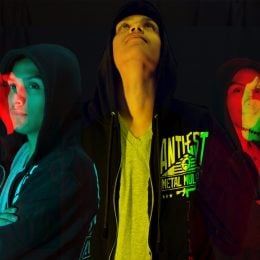
Double Colors Exposure Assignment

The goal of this assignment is to show an understanding of how double color exposure works.

Procedure

  1. Take six different pictures. 3 from the side and 3 from the front
  2. After you have all six pictures, upload them to Photoshop and select two that you want to use for this assignment. 
  3. Your images must be uploaded on a blank canvas
  4. Change the colors as much as you would like. Try your best to ensure each person is colored differently than the other 
  5. Upload a 50-100 word description outlining how you did this assignment
  6. This will be due on Monday, May 27th
Rubric
Photos (8 Marks)
Description (4 Marks)
Overall (12 Marks)

Double Colors Exposure Lesson

Double Colors Exposure
You will be creating a Double Color Exposure using Photoshop and Portraits to create a color fringing look. You will be taking portraits of your partner in two (or three) different angles. You will need to fill the frame and make sure you shoot from the waist up. It is your decision on the orientation of the images. Although, you will need to make sure that the two images you choose to use are orientated the same way. For example, both should be either horizontal or vertical.
You need 6 different poses: 3- side view and 3-front view. This will allow you to try various color combinations. You must shoot your images on a blank, clean background. The studio works best, but if you can find a nice solid background outside that will work just fine.

Step by Step Guide to Creating Double Color Exposure 

  1. Bring both images into Photoshop, open a new document and and place both images in, onto two separate layers.Then on the top layer click the fx tool [layer styles]button at the bottom of the Layers Palette.
  2. Uncheck the R G B boxes in the advanced blending station. As you click the boxes one-by-one you will see your image change colors. Once you get the color combination you like hit OK.
  3. Then if there is left over space after adjusting where you want the images to be, select a slice of the image with the correct color [make sure it is just the background and does not contain any of the subject inside] using the Marquee Tool.
  4. Then click CTRL + T and it will turn your selection into the bounding boxes to transform it. Pull from the side to stretch it out.
  5. Then add and adjustment layer [selective color] to refine the color combinations you chose.
Double Color Exposure Video 
Watch this Video in order to get a better understanding of how double color exposure works. 

Thursday, 9 May 2019

Recreate a Photo Lesson + Assignment

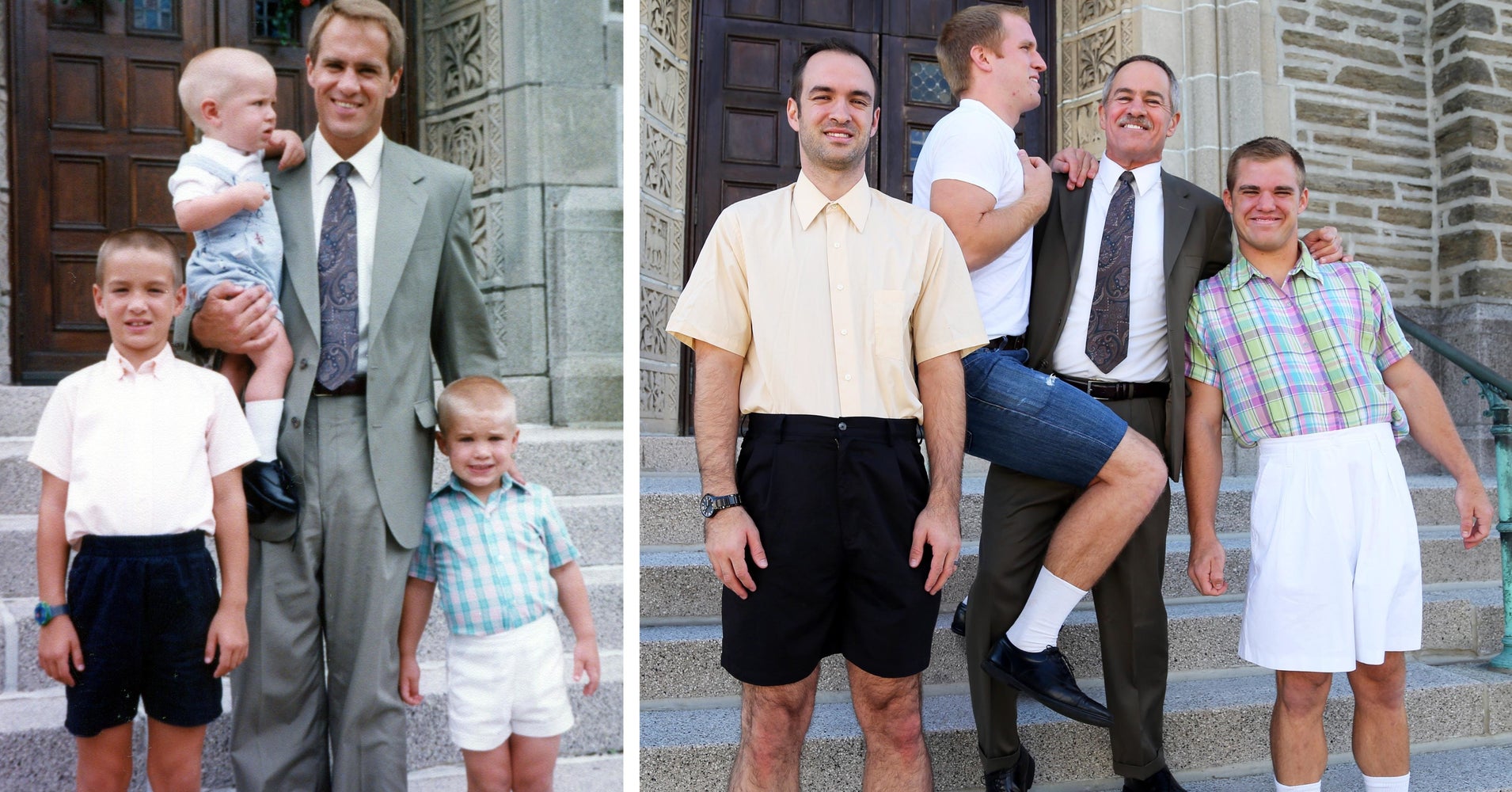
Recreating a photo can be a terrific and fun journey. When people choose to recreate photos it generally will be them recreating something from their past. For example, they may recreate pictures from their childhood as adults or recreate a famous image off of the internet.

Image result for recreate a photo

Now that you have extensive experience with a camera, it is time to recreate a photo yourself or using one from the internet.

Recreate a Photo Assignment

  1. Recreate three different pictures from either your past or from pictures off of the internet
  2. Upload both the original and new photos together onto your blog
  3. Title the assignment "Recreate a Photo Assignment."
  4. Add a 100 word descriptor about the similarities and/or differences in your new photo from the original 
  5. This assignment will be due Tuesday, May 21
Rubric
Photos (6 Marks)
Description (4 Marks)
Overall (10 Marks) 

Friday, 12 April 2019

Stop Motion Photography Lesson 4

Now that we have learned how to create photos, it is important we understand how to assemble the final video product. In order to accomplish this feature, we are going to be using a program called premiere pro.

Steps to Assembling the Video
  1. Starting and Opening a Project
    • Open an existing project (Windows: Ctrl+O, Mac: Cmd+O), or start a new one (Windows: Ctrl+Alt+N, Mac: Opt+Cmd+N) from the Premiere Pro Start screen.If you are starting a new project, the New Project dialog launches. From the New Project dialog, you can specify the name and location of the project file, the video capture format, and other settings for your project.After you have chosen settings in the New Project dialog, click OK.

      2. Capture and Import Video and Audio
    • For file-based assets, using the Media Browser you can import files from computer sources in any of the leading media formats (Windows: Ctrl+Alt+I, Mac: Opt+Cmd+I). Each file you capture or import automatically becomes a clip in the Project panel. Alternatively, using the Capture panel, capture footage directly from a camcorder or VTR (Windows: F5, Mac: F5). With the proper hardware, you can digitize and capture other formats, from VHS to HDTV.You can also import various digital media, including video, audio, and still images. Premiere Pro also imports Adobe® Illustrator® artwork or Photoshop® layered files, and it translates After Effects® projects for a seamless, integrated workflow. You can create synthetic media, such as standard color bars, color backgrounds, and a countdown.

      3. Assemble and Refine a Sequence 
    • Using the Source Monitor, you can view clips, set edit points, and mark other important frames before adding clips to a sequence. For convenience, you can break a master clip into any number of subclips, each with its own In and Out points. You can view audio as a detailed waveform and edit it with sample-based precision.You add clips to a sequence in the Timeline panel by dragging them there You can view the edited sequence in the Program Monitor or watch the full-screen, full-quality video on an attached television monitor. 

       4. Add Titles
    • You can easily create titles directly on your video using the Essential Graphics panel in Adobe Premiere Pro. Use these keyboard shortcuts to create a new text layer (Windows: Ctrl+T, Mac: Cmd+T). You can add text, shapes, and so on, to layers that you can rearrange and adjust.

      5. Add Transitions and Effects 
    • The Effects panel includes an extensive list of transitions and effects you can apply to clips in a sequence. You can adjust these effects, and a clip’s motion, opacity, and Variable Rate Stretch using the Effect Controls panel (Windows: Ctrl+D, Mac: Cmd+D).
    • The Effect Controls panel also lets you animate a clip’s properties using traditional keyframing techniques. As you adjust transitions, the Effect Controls panel displays controls designed especially for that task. Alternatively, you can view and adjust transitions and a clip’s effect keyframes in a Timeline panel. 

      6. Mix Audio  
    • For track-based audio adjustments, the Audio Track Mixer emulates a full-featured audio mixing board, complete with fade and pan sliders, sends, and effects.
      • Audio clip mixer: (Windows: Shift+9, Mac: Shift+9)
      • Audio track mixer: (Windows: Shift+6, Mac: Shift+6)
Video to Assist with Premiere Pro

In order to better understand Premiere Pro, use this video to help you assemble your end product.

Wednesday, 10 April 2019

Stop Motion Photography Lesson 3

Shutter Speed, Aperture and ISO

It is important to consider that many variables will alter how fast the shutter speed will need to be. These variables include the speed of the subject, light source and the angle of where you are taking the shot from. For example, taking images of a moving vehicle or a bird will require a much quicker shutter speed (1/2,000 or 1/4,000). However, taking pictures of something that moves at a slower speed (waterfall, writing/re-arranging letters) will require a much slower shutter speed (1/10, 1/30). Note: if you have a high shutter speed it will lower your depth of field.

In regards to aperture, you will need to manually play around with its settings until you get the proper exposure that you want. Do keep in mind that a high shutter speed will require a wider lens (f/2.8, f/1.5).

Finally, in regards to ISO, if you increase the size it will help your photos receive more light. Do keep in mind that the larger your ISO, the higher of a chance your photo can have "noise."

Overall, everything will depend on what you are trying to create. Expect a bit of trial and error in regards to this. It is still highly recommended you do all of your settings in manual mode as changing it to automatic can change one or more of these settings.

Stop Motion Photography Video

Watch this video to better understand what an end product will look like.

Tuesday, 9 April 2019

Stop Motion Photography Project

The purpose of this project is to use all of the information we have learned in photography to create a short film. Note: this will be your term project.

Procedure:

  1. Create a group of 3-4 students. 
  2. Before you begin shooting, discuss with your group what you want your story to be about.
  3. There is no minimum or maximum amount of pictures you need to take. Take as many as you feel necessary for the time duration of the project. 
  4. The video should be 25-30 seconds (but you are permitted to go a few seconds over)
  5. Have opening and closing credits.
  6. You must submit a script which has a clear story line. 200-300 words. 
  7. You must also explain why you chose to create this story line and the purpose you were trying to achieve. 100-150 words. 
  8. You will be supplied with the cameras, but you are more than welcome to use your own. 
  9. There is an app for your phone called "stop motion." You are permitted to use this if it will aid in your project. 
  10. You are required to include sound. While music is acceptable, someone or multiple people from your group should assume a speaking role. 
  11. This project will be due Friday, April 26th, 2019.

Rubric:


Exceeds Expectations
Meets Expectations
Satisfactorily Meets Expectations
Does not Meet Expectations
Social and Personal Responsibility
Students are always on task and getting the assignment completed on time.
Students mostly on task. Assignment completed on time.
Students did not use time wisely. Project was not completed on time as a result.
Students wasted their class time. Did not complete project in a timely manner.
Stop Motion
(x3)
Movement of objects and/or characters was smooth. Excellent camera stability.
Movement of characters is smooth. Good camera control is demonstrated.
Adequate movement of objects and/or characters. Camera control can be shaky.
Movement patterns are unrealistic. Camera is consistently shaky.
Opening and Closing Credits
Opening and closing credits are there and follow all guidelines.
Opening and closing credits are there but may be missing a certain element.
Opening and closing credits are attempted but missing multiple elements.
No opening or closing credits.
Sound
Sound effects and/or music contribute to the quality of the story.
Sound effects and/or music contribute well to the story.
Sound effects and/or music are added but do not contribute to the story in meaningful way,
Sound effects and/or music is missing from the assignment.
Storyline
Clear storyline is followed and presented well in the film.
Storyline is mostly clear and presented quite well in the film.
Film had a story, but it could have been expressed more efficiently.
No clear storyline during the film.
Script
(x2)
Script is well-written and has an interesting plot/idea.
Script is fairly well written and the plot/idea is presented in a strong manner.
Script has its positives but had lots of room for improvement.
Script is irrelevant and/or has not been submitted.
Goal and Purpose
Goal and purpose of the project is clearly communicated.
Goal and purpose of the project is fairly well communicated.
Goal and purpose is not communicated very well.
Goal and purpose has not been communicated.


Comments:                                                                                                                                                                                                                                                                                                                                                                                                                                                                                                                                                                                                                                                                             
                                                                     /40

Monday, 8 April 2019

Stop Motion Photography Lesson 2

Camera Tips for Stop Motion Photography

  1. Ensure your camera is either on a tripod or make sure the individual taking the pictures is keeping the camera steady. Ensure that the camera is focused on the subjects as well. 
  2. You do NOT want the focus or exposure to change. Therefore, you should take each picture manually. 
  3. Be careful with the lighting. As you begin to change angles it could affect how much light is entering each shot. 
  4. Take each picture 2 or 3 times. In the event the lighting is off or something inadvertently appears in the background, having backup data is essential because recreating that entire scene perfectly in conjunction with your story can be difficult. 

Tips for Producing Your Film

  1. Brainstorm the Idea
    • Your story needs to have flow and progression. Discussing what you want your idea to be and how you will enact it will be useful. 
    • We also brainstorm because if one element is off, it can ruin your entire video. 
  2. Plan it Out
    • It is recommended you have a storyboard or a concrete plan as to how you want your video to look and the order of your scenes. If you just take your pictures and sort it out using that method, it will take significantly longer. 
  3. Make Each Shot Count
    • Do not take each image and assume "I will edit this in Photoshop." 
    • You will have well over 100 pictures to analyze and will not have the time to edit each one. Make each shot count. 
  4. Audio
    • Audio is very important to stop motion photography. Whether it is filled with people acting as characters, someone narrating or even music to add to the atmosphere; it can be crucial to the success of your film. 
    • It is recommended you add the audio closer to your completion because if a scene needs to be changed, it will throw off the entire audio track. 
  5. Over and Over Again
    • Once you have completed your video, it is important to watch it over and over again. This is done to see if the audio is off, a scene is missing or anything else that may have been missed during the screening process. 
    • It is also recommended you watch every time you produce a few seconds. That way you can catch a mistake before it reaches the end of the video. 
Stop Motion Photography Video #2

To help you better understand stop motion photography, here is a short video that explains how to do it. 

Tuesday, 2 April 2019

Stop Motion Photography Lesson 1

What is Stop Motion Photography?

Stop motion animation/photography is the idea filming objects or subjects one frame at a time. Simultaneously with filming subjects one frame at a time, you need to move said subject a little bit in between frames. This is to resemble lifelike motion and that there is movement during your story. 

Do not move your object too much or else it will not look realistic.

The Beginning Process

It is important to remember that each film will need a story and a purpose.

Stop motion photography is best expressed when there is a story to follow. Whether it is a silent film, or one with actors, having development will draw the audience in. In regards to development, a story should have a beginning, a climax and a definitive conclusion. It may help to produce a script before you begin the filming process.

Additionally, there needs to be a purpose. Why are you making this video? Are you trying to tell a story or about a global issue?


Stop Motion Photography Video

if you would like a more detailed review of stop motion photography, please refer to the following video

Note: this video will be a preview for lesson 2. 

Monday, 11 March 2019

Reflection Photography Assignment

The goal of this assignment is to take an picture whilst using a reflective photograph method.

Procedure

  1. Take one picture using the reflection photography method
  2. You can use anything to help you take this image (water, tables, windows etc.)
  3. Write a 100-150 word description that answers the following questions
    1. What was the goal of your picture?
    2. Explain whether or not you felt reflection photography added an extra element to your picture
    3. What was the best aspect of your image (state only one) and why was it a positive above all else
  4. Title the assignment ``Reflection Photography Assignment``
  5. This will be due Friday, March 15th

Rubric
Photograph (5 Marks)
Description (5 Marks)
                Overall (10 Marks)

Reflection Photography Lesson

What is Reflection Photography?

Reflection photography is the idea taking pictures using something that would offer a mirrored image.

There are many different methods you could use to accomplish this. For example, you can take a picture using water (lake, ocean, sea etc.), glass or anything else that offers a reflection. Below are some examples of reflection photography.


As you can see in the images above, the first is taking an picture of a building using a puddle. Second, in the image with tables and chairs you can see a tree through the reflection of the table. In both images thew view is upside down and requires you to think. Therefore, we have to consider why we are taking these photos.

Why do Reflection Photography?

The main purpose of reflection photography is to offer a different perspective on traditional photos. Essentially, you are turning the world upside down, whilst adding confusion to the scene. Upon seeing your image, it should be difficult to spot the source of the image.

If done correctly, the picture can produce something beautiful as you can see below.

Friday, 1 March 2019

Forced Perspective Photography Assignment

The purpose of this assignment is to show an understanding of distance and depth within your photograph.

Procedure
  1. Take 2 photographs using Forced Perspective Photography
  2. Your photos can be of anything. Use your imagination! 
  3. Write a 100-150 word description answering the following questions: 
    1. What was your goal for each of your two images?
    2. What is one thing you would change about each of your images?
    3. Why did you choose that scene these two pictures? 
  4. Title the assignment "Forced Perspective Photography Assignment."
  5. This assignment will be due Thursday, March 7th 

Rubric
2 Photographs (5 Marks)
Description (5 Marks)
                Overall (10 Marks)

Forced Perspective Photography Lesson

What is Forced Perspective Photography?

Forced perspective photography deliberately tricks the viewer to believe that some subjects/objects are bigger or smaller than they really are. Essentially, forced perspective photography is a game of illusions that distorts objects/subjects by making them appear closer or further away in the background than they truly are.

While this may sound complicated, it is actually quite simple. Look at these examples below.


This hand appears larger than life; but in actuality it would be nowhere near the size of the person it is pretending to grab.


In this image here it appears the individual is grabbing the sun. While the sun is obviously nowhere near the person, the photographer has created the illusion that he is in fact touching the sun.


The key aspect of forced perspective photography is distance. Distance between the subject(s) and object(s) is pivotal as it is important not to show blur, but still make the image look as authentic as possible despite its illusion. Tip: The object you want to appear bigger should be closer to the camera, while the part of the image you want to look smaller should be further away.

Video Explaining Forced Perspective Photography

Watch this Video in order to better understand forced perspective photography.


Monday, 25 February 2019

Macro Photography Assignment

Macro photography is an important concept which will help you take closer-up images. This assignment is designed to show an understanding of macro photography. 

Procedure

  1. You are only required to take one picture for this assignment 
  2. Find something small that you could enhance to appear large 
  3. Whichever of the two methods you use to take this image is perfectly fine
  4. Once you have your photograph, submit a 100-150 word description that answers the following questions
    1. How did you take this image? 
    2. Why did you choose to focus on this particular object/subject? 
    3. Outline one positive and one thing you would have changed in this photograph
  5. Title this assignment as "Macro Photography Assignment."
  6. This assignment will be due Friday, March 1st 2019

Rubric:

Photograph (5 Marks)
Description (5 Marks)
                  Overall (10 Marks)

Macro Photography Lesson

What is Macro Photography?

Macro Photography is the idea of taking a close-up photograph of real life objects. Its main purpose is to give a life like size to something small such as flowers or insects.

In macro photography you want your image to be sharp so that it can illustrate something that was not otherwise visible to the human eye. For example, look at this image below of an insect

Notice how clearly you can see the hairs on the insect as well as the outline of the leaf.

In order to take the best macro photograph, it is important to consider the following two tips

  1. You can engage your camera into macro mode via the settings
    1. Note if you explore this option it could begin to affect your aperture which in turn could change your lighting
  2. You can manually set everything up (zooming, lighting, distance, depth etc.)

It is recommended to use a small aperture which would allow you to create a more detailed focus on the object/subject you are trying to photograph.


Notice how there is not much depth to any of these photographs. The photographer is aiming to focus on elements of these insects/amphibians that are invisible without the macroscopic perspective.

Video of Macro Photography

In order to better understand how to take a macro photograph, watch this video.

Thursday, 7 February 2019

Presentation Rubric

Name:                                                       

Exceeds Expectations
Fully Meets Expectations
Meets Expectations
Minimally Meets Expectations
Does not Meet Expectations
Presentation


/10
Presentation within time slot. Eye contact was always maintained and the flow was excellent.
Presentation was within the time slot. Eye contact was maintained throughout the presentation. Strong flow.
Presentation fell reasonably within the time slot. Some eye contact made. Flow of presentation could be improved.
An attempt was made to be within the projects time frame. Attempts at eye contact were made.
Presentation is too short. No eye contact was made and voice was hard to hear. Flow was too quick or too slow.
Content


/20
Questions are answered in full detail and all content is relevant to the topic.
All questions are answered in rich detail. Most content is relevant to the topic.
Questions are answered in fair detail. However, more descriptions would have aided the assignment. Some content relevant to the topic.
Some questions addressed. Some information is irrelevant to the topic.
It does not answer nor follow any of the guidelines or guidelines. Majority or all of the information does not aid the presentation.
Organization and Design

/10
All slides are designed well and are in a sequential flow.
Majority of the slides are designed well and is in a sequential flow.
Attempts at design are made but fall short. Slides are organized fairly well.
Majority of slides are not designed nor does there seem to be a sequential flow.
Little or no designs on slides. Presentation is completely disorganized.
Spelling and Grammar

/5
Presentation is free of spelling and grammar errors.
Presentation has very few spelling and grammar errors.
Presentation has some spelling and grammar errors. Slightly impedes presentation.
Presentation has many spelling and grammar errors. It impedes the presentation.
Presentation is full of spelling and grammar errors. It completely impedes the presentation.
Worksheet

/10
Worksheet offers a comprehensive review of your project.
Worksheet offers a solid review of your project.
Worksheet offers a fair review of your presentation.
Worksheet is unrelated to  presentation or it offers minimal review
Worksheet is completely unrelated to presentation. Offers no review.
Citations

/5
All information is cited perfectly in APA format.
All information is cited strongly in APA format.
Few citation errors.
Multiple citation errors.
No citations provided or project has numerous citation violations.

Additional Comments: